
Ads
Ads are reusable advertising items that can be added to Marketing Campaigns and shown to WiFi visitors during the guest access process.
WiFi Hotspot supports three ad types:
Video
Image
App
Create an Ad
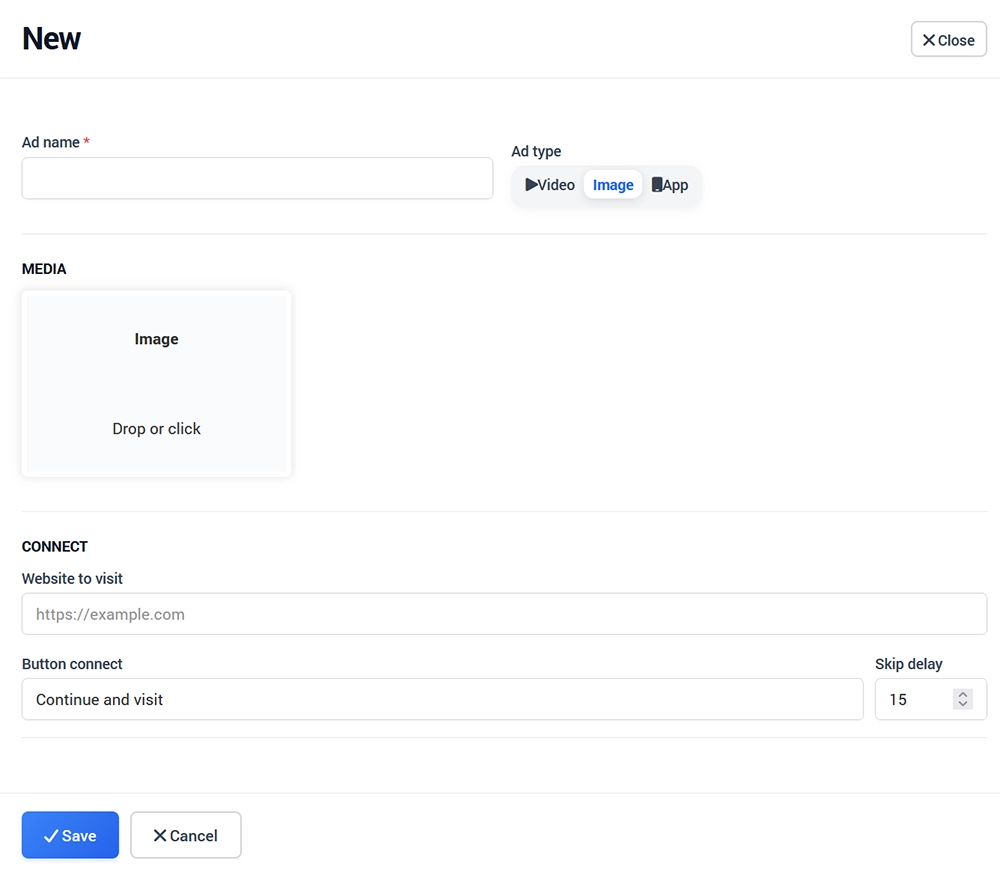
Open:
WiFi Marketing → Ads
Click + New and configure:
Ad name
Ad type
Media or app content
Website to visit
Button connect
Skip delay
Click Save when finished.
Video Ad
Select Video to upload an MP4 file or use a supported YouTube source.
Configure the destination website, button text, and delay before the visitor can continue.
Image Ad
Select Image and upload the image that should be displayed.
Then configure the destination URL, button text, and skip delay.
App Ad
Select App to promote a mobile or desktop application.
You can configure:
App image
Download message
Google Play URL
Apple App Store URL
Windows Store URL
Destination website
Button text
Skip delay
Use Ads in Marketing Campaigns
Creating an Ad does not automatically display it to WiFi visitors.
Add the Ad to a Marketing Campaign, then configure the campaign location, dates, audience, and delivery options.
See Marketing Campaigns for the complete setup process.
Manage Existing Ads
The Ads panel lists all previously created advertisements.
Use the available actions to:
Edit an Ad
Delete an Ad
Search existing Ads
Ads can be reused in multiple campaigns when appropriate.