
Welcome Page
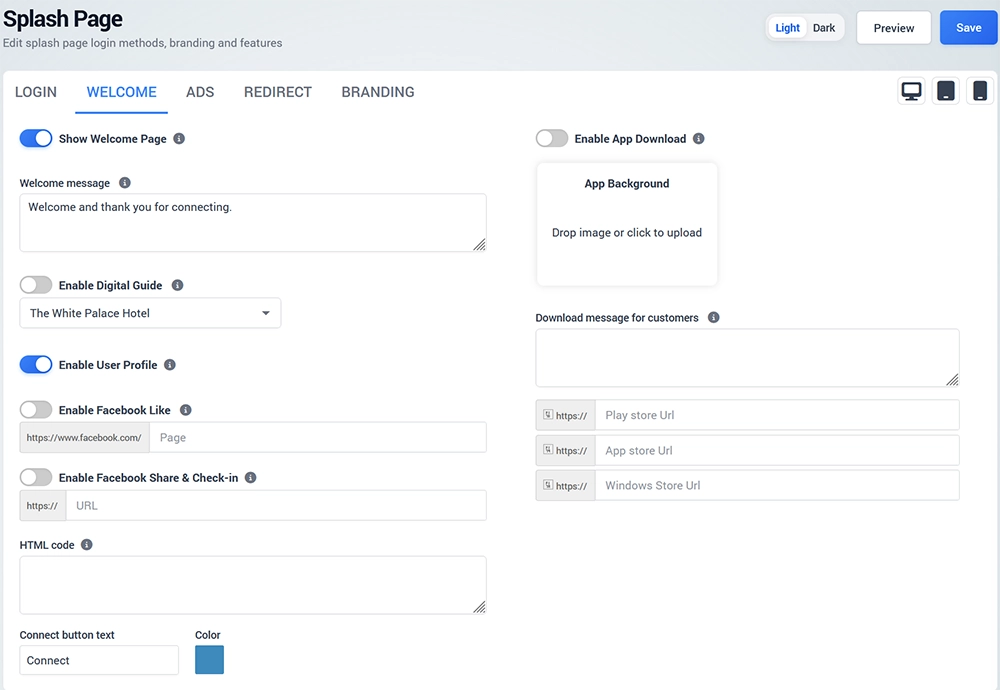
The Welcome tab controls the page displayed after the guest completes the login process when the Welcome Page is enabled.
Display a post-login welcome message and optionally provide access to Digital Guide, User Profile, app downloads, or custom content.
Show Welcome Page
Enable Show Welcome Page and enter the message that should be displayed to successfully authenticated visitors.
For example:
Welcome and thank you for connecting.
Digital Guide
Enable Digital Guide when you want guests to have access to a configured Digital Guide after login.
Select the appropriate Digital Guide from the available list.
User Profile
Enable User Profile to give authenticated users access to their account information and available self-service options.
Depending on the configuration, users can review their Internet Plan, device information, personal details, contact permission, and other available account settings.
App Download
Enable App Download when you want to promote a mobile or desktop application after WiFi login.
You can configure:
App background image
Download message
Google Play URL
Apple App Store URL
Windows Store URL
Only configure the stores where your application is actually available.
HTML Code
Use the available HTML field when additional supported content needs to be displayed on the Welcome Page.
Connect Button
Configure the Connect button text and color to match the required guest experience and page branding.