
Branding
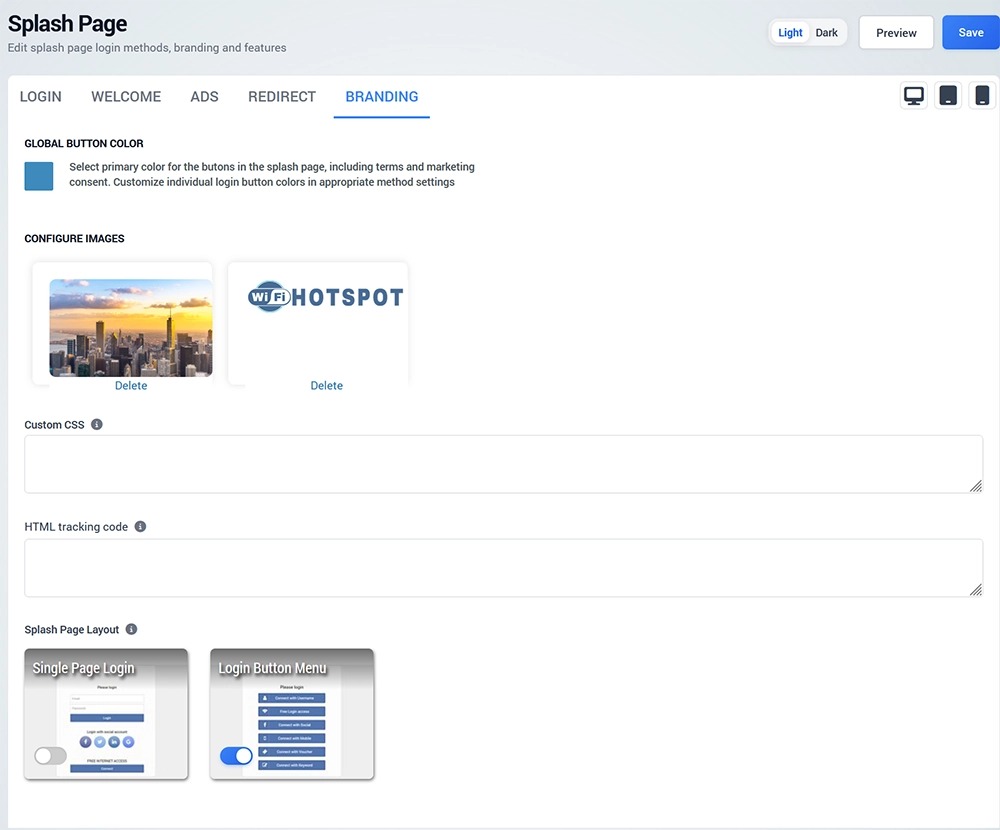
The Branding tab controls the visual appearance and advanced customization of the Splash Page.
Global Button Color
Select the primary button color used across the Splash Page.
Individual login methods may also provide their own button color settings when a different appearance is required.
Choose colors that maintain sufficient contrast and remain easy to read on mobile devices.
Background and Logo
Upload or replace the Splash Page:
Use images optimized for web display so the Splash Page loads quickly on guest devices.
Background - jpg 1000px width
Logo - png, transparent 400 px width
Custom CSS
Use Custom CSS when additional styling is required beyond the standard editor controls.
Custom CSS can be used to modify supported visual elements of the Splash Page.
Test custom styling carefully on desktop and mobile devices before using it in production.
HTML Tracking Code
Use HTML tracking code when supported analytics or tracking code needs to be included.
Only use code from trusted services and verify that its use complies with your privacy and consent requirements.
Splash Page Layout
Choose the layout used to present login methods.
Available layouts include:
Single Page Login
Login Button Menu
Single Page Login displays the selected login options directly on the page.
Login Button Menu presents the available login methods as a menu, allowing visitors to choose how they want to access WiFi.
Select the layout that provides the clearest experience for the number of login methods configured on your page.