
Voucher Reseller System
The Voucher Reseller System allows partners and business operators to build a reseller network for distributing and selling WiFi access.
Credit can be allocated from the Partner account to customer accounts and then distributed to resellers who create and sell WiFi tickets or vouchers. This provides centralized control over reseller balances, commissions, transactions, and credit usage.
The Voucher Reseller System is available with the appropriate WiFi Hotspot edition and reseller configuration.
How the Voucher Reseller System Works
The reseller system is organized into three levels:
Partner → Business Account → Reseller → WiFi Customer
A typical workflow is:
The Partner receives payment from a Business Account.
The Partner adds credit to that account.
A commission bonus can be applied according to the reseller agreement.
The Business Account allocates part of its available credit to resellers.
Resellers create and sell WiFi access tickets or vouchers.
Credit is deducted according to the Internet Plan used for each sale.
Partners and account administrators can monitor reseller activity through Transactions and Credit Usage reports.
This structure allows WiFi access sales to be distributed across multiple properties, reception desks, kiosks, agents, or other sales points while maintaining centralized control.
Partner Admin
Partner administrators manage account credit and monitor the reseller network from the Partner portal.
Add Credit to an Account
To allocate credit:
Log in to the Partner portal.
Open Accounts.
Select the required customer account.
Open the account's Credit settings.
Enable Credit when required.
Click Add Credit.
Enter the amount received from the customer.
Apply the configured commission bonus when applicable.
Save the changes.
The allocated amount becomes available to the Business Account and can subsequently be used or distributed to its resellers.
Reseller Dashboard
Open the Resellers section of the Partner portal to review reseller-related activity.
The dashboard provides four main sections:
Accounts
Resellers
Transactions
Credit Usage
The summary at the top of the page provides an overview of the reseller network, including account totals, available credit, reseller count, and credit allocated to resellers.
Accounts
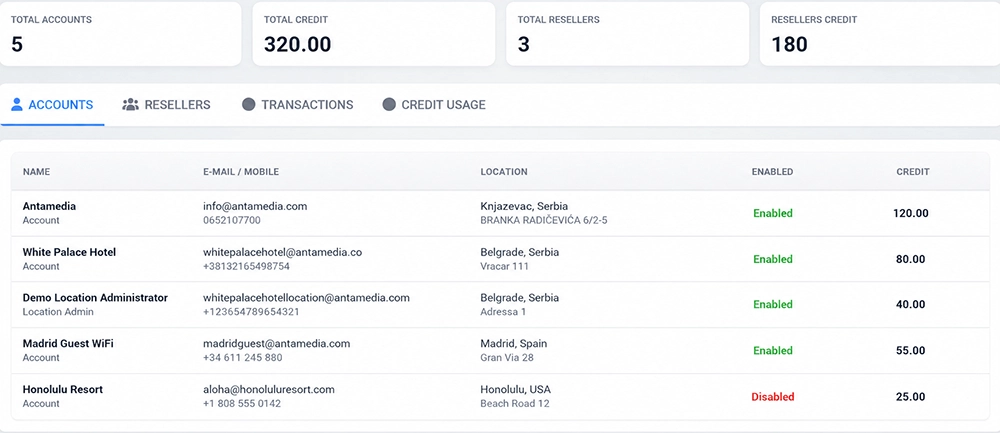
The Accounts tab provides an overview of customer accounts participating in the credit and reseller system.
The table can include:
Account name
E-mail and mobile number
Location
Credit status
Available credit
Use this section to review how reseller-enabled customer accounts are organized and how much credit is available to each account.
Resellers
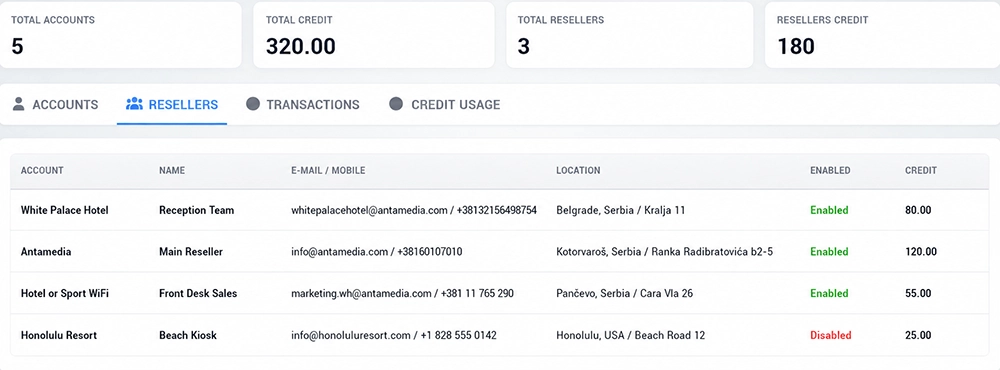
The Resellers tab lists resellers operating under the managed accounts.
Available information can include:
Parent account
Reseller name
E-mail and mobile number
Location
Enabled status
Assigned credit
This provides a centralized view of reseller activity across multiple customer accounts.
Use this page to identify which resellers are active and how much credit is currently assigned to each one.
Transactions
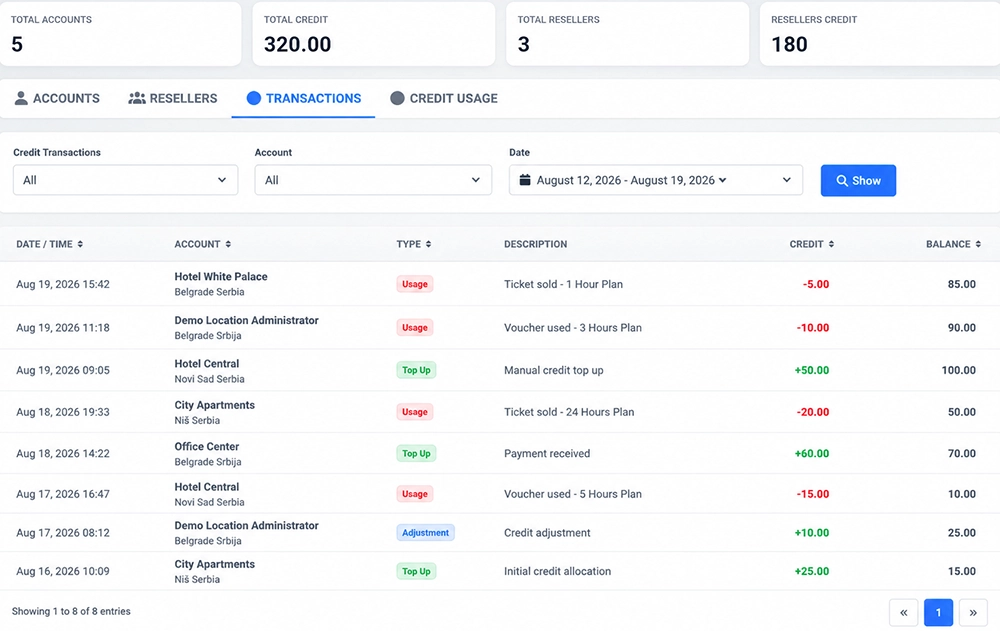
The Transactions tab provides a history of credit movements within the reseller network.
Use the available filters to review:
Credit transaction type
Account or reseller
Date range
After selecting the required filters, click Show.
Transaction activity can include events such as:
Credit received
Credit allocated
Credit top-up
Credit adjustment
Credit consumed through WiFi access sales
The transaction history helps partners trace how reseller credit moves through the system and investigate individual balance changes.
Credit Usage
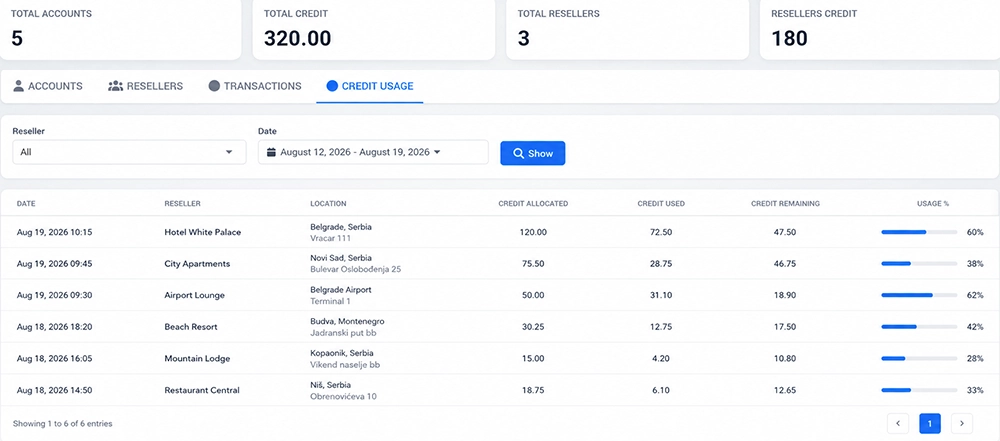
The Credit Usage tab shows how reseller credit is consumed.
Filter the report by:
Reseller
Date range
Click Show to display matching usage activity.
Credit Usage helps partners understand which resellers are actively using their allocated balance and how much credit is being consumed through WiFi ticket or voucher sales. The existing system also tracks voucher/ticket generation and the amount spent from reseller credit.
Monitor Partner-Level Reseller Activity
Partners should periodically review:
Total accounts
Total available credit
Number of resellers
Credit allocated to resellers
Individual account balances
Individual reseller balances
Credit transactions
Credit usage
This provides a complete overview of how reseller credit is distributed and consumed across the managed network.
Business Account
A Business Account receives credit from the Partner and uses that balance to provide WiFi access directly or distribute credit to its own resellers.
When the Partner allocates additional credit, the updated balance becomes available to the Business Account.
Configure Reseller Credit
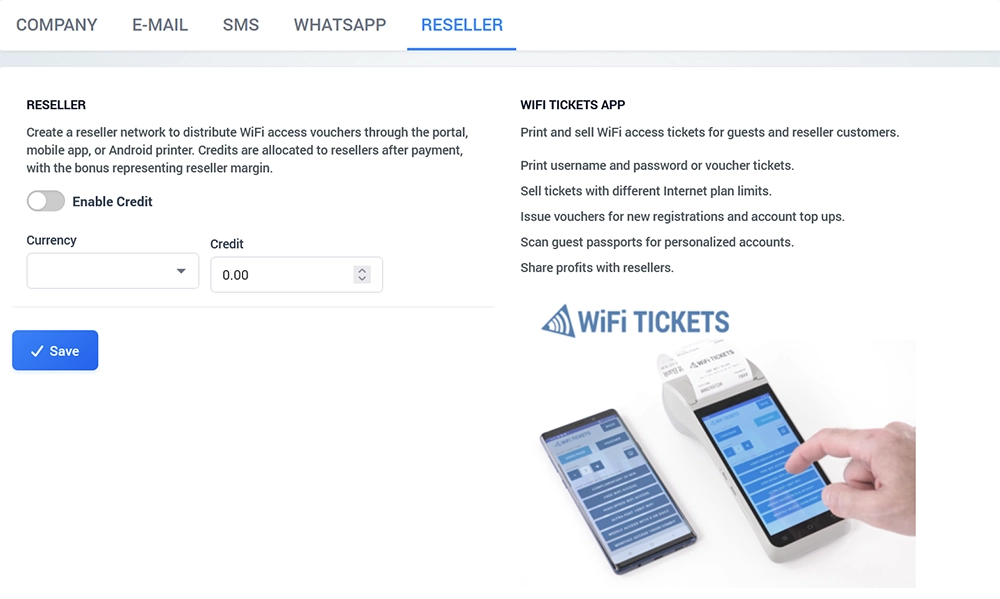
Open:
My Account → Reseller
Enable Credit when the account should operate with reseller credit.
Configure:
Currency
Available credit
Reseller commission or bonus settings
The account's available balance is the credit that can be used for WiFi access distribution.
Create WiFi Access from Account Credit
Business Account administrators can use available credit when generating WiFi access.
Depending on the configured workflow, administrators can create:
Username and password accounts
Login codes
Vouchers
WiFi Tickets
Select the required Internet Plan when generating access.
The corresponding credit amount is deducted according to the plan or reseller configuration. The current system documentation confirms that account credit is reduced as usernames/passwords or vouchers are generated.
Create Resellers
Business Account administrators can create reseller accounts and allocate part of their available credit to them.
A reseller can represent, for example:
Hotel reception
Restaurant
Front desk
Ticket kiosk
Remote sales office
Local agent
Managed property
This allows one Business Account to distribute WiFi sales across several operational points.
Business Account Reseller Reports
Open Setup → Resellers to monitor the reseller network.
Available sections include:
Resellers
Transactions
Credit Usage
The Resellers view shows individual reseller accounts and their assigned credit.
Transactions provides a record of credit changes, while Credit Usage shows how allocated reseller credit has been consumed.
Reseller
A Reseller receives an allocated credit balance and uses it to create or sell WiFi access.
The reseller does not need access to the complete Business Account administration environment.
Instead, the reseller can use the available reseller tools to create and distribute WiFi access while the account owner retains centralized control over credit and reporting.
Reseller Credit
Each reseller operates with an assigned credit balance when the credit system is enabled.
Credit is reduced as the reseller creates or sells WiFi access according to the configured Internet Plan prices.
When the available balance becomes low, additional credit can be allocated by the account owner after the reseller completes the agreed payment process. This prepaid credit model is part of the existing Voucher Reseller System workflow.
WiFi Tickets App
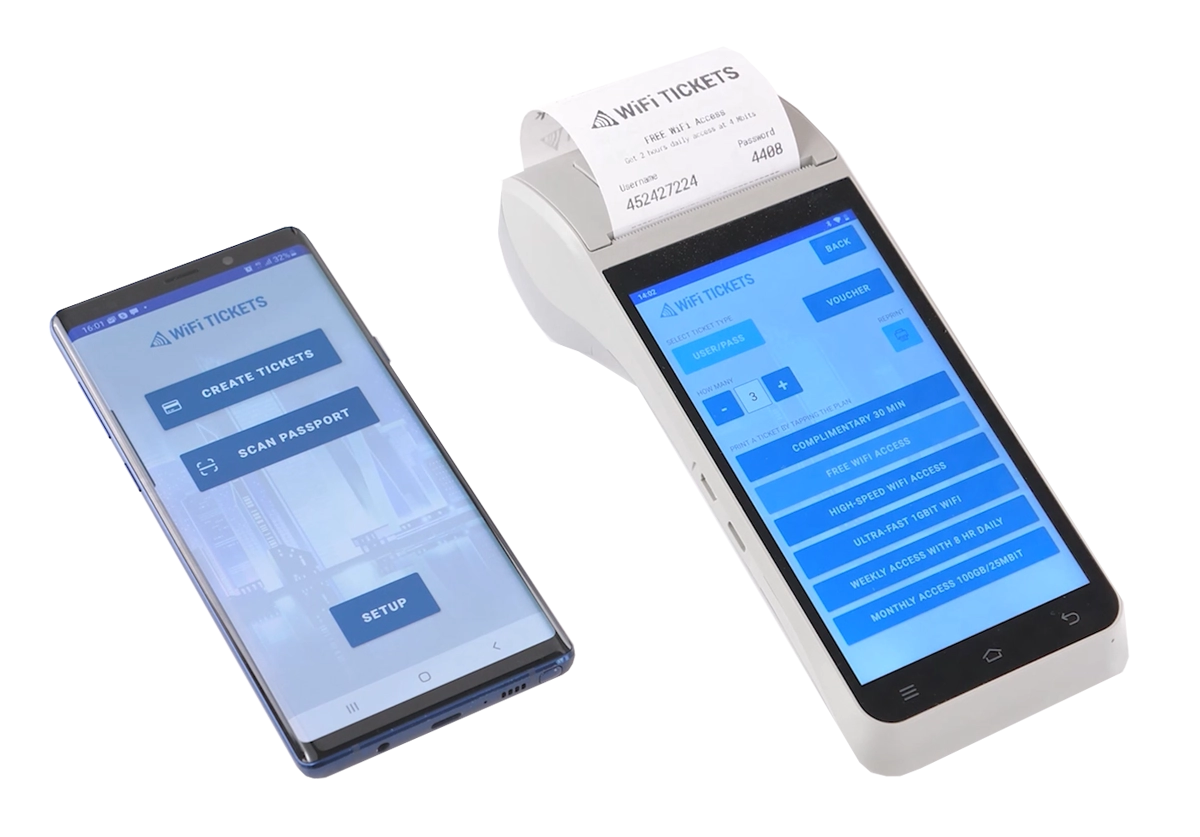
Resellers can use the WiFi Tickets App to create and distribute guest WiFi access.
Depending on the configuration, the application can be used to:
Print username and password tickets
Print voucher tickets
Sell access with different Internet Plan limits
Create vouchers for new registrations
Create vouchers for account top-ups
Scan guest passports for personalized accounts
Work with reseller credit
Share the configured reseller margin
This makes the system suitable for front desks, receptions, kiosks, agents, and other points where staff need to issue WiFi access quickly.
Reseller Transactions
Resellers can review their credit transactions to understand how the available balance has changed.
Transaction history can help identify:
Credit received
Credit adjustments
Ticket or voucher sales
Other credit usage
This provides transparency between the reseller and the account owner.
Reseller Credit Usage
The Credit Usage report helps the reseller see how allocated credit has been consumed.
This is useful for comparing:
Credit received
Credit used
Remaining balance
WiFi access activity over time
When additional credit is required, the reseller can arrange a new credit allocation with the account owner.
Example Voucher Reseller Workflow
Consider a Business Account with several locations.
The Partner allocates 1,000 credits to the Business Account.
The Business Account then distributes:
Hotel Reception – 300 credits
Restaurant – 150 credits
Beach Kiosk – 100 credits
Conference Desk – 200 credits
The remaining credit stays available at the Business Account level.
Each reseller can then use its balance to create WiFi access according to the available Internet Plans.
As tickets or vouchers are sold:
The reseller balance decreases.
The transaction is recorded.
Credit usage becomes visible in reporting.
The Business Account can allocate additional credit when required.
The Partner retains visibility over account and reseller activity.
This allows the WiFi operator to expand sales to multiple points without giving every reseller unrestricted access to the main account.
Commission Bonus
A commission bonus can be used to define the reseller margin.
For example, when an account or reseller purchases credit, an additional configured percentage can represent the reseller's commercial margin.
The exact commission model should reflect the agreement between the Partner, Business Account, and reseller.
Partners can monitor the configured commission together with reseller credit and transaction activity.
Internet Plans and Reseller Credit
Internet Plans determine the WiFi access being sold.
Different plans can represent different services, such as:
1 Hour WiFi
3 Hours WiFi
24 Hours WiFi
Weekly WiFi
Premium WiFi
Conference WiFi
Each plan can have its own access conditions and reseller value.
When the reseller issues a ticket or voucher, the corresponding amount is deducted from the available reseller credit.
This allows different WiFi products to be sold through the same reseller network.
Monitor Credit and Sales
The reseller reporting system should be used regularly to monitor:
Available account credit
Credit assigned to resellers
Individual reseller balances
Credit received
Credit issued
Credit consumed
Voucher and ticket activity
Transaction history
Use the Accounts, Resellers, Transactions, and Credit Usage reports to identify how credit moves from the Partner level to individual sales points.
Recommended Reseller Workflow
For a new reseller deployment:
Enable the credit system.
Configure currency and commission settings.
Allocate credit to the Business Account.
Create reseller accounts.
Assign the appropriate locations.
Allocate credit to each reseller.
Configure the Internet Plans that resellers can sell.
Provide access to the reseller portal or WiFi Tickets App.
Create several test vouchers or tickets.
Confirm that the appropriate credit is deducted.
Review the Transactions report.
Review Credit Usage.
Confirm that remaining account and reseller balances are correct.
Perform the complete test before allowing resellers to sell production WiFi access.
Centralized Voucher Reseller Management
The Voucher Reseller System provides a structured way to distribute WiFi access sales across multiple accounts, locations, and resellers.
Partners retain control over account credit, Business Accounts manage their reseller network, and individual resellers can sell WiFi access using only the balance and permissions assigned to them.
Transactions and Credit Usage reports provide visibility into how credit is allocated and consumed throughout the reseller network.