
Resellers
The Resellers section provides centralized management and reporting for your WiFi reseller network.
Use it to review reseller accounts, monitor allocated credit, track credit transactions, and analyze how reseller credit is being used.
The page is organized into three main sections:
Resellers
Transactions
Credit Usage
Reseller Overview
The summary at the top of the page provides a quick overview of your reseller network.
Available statistics include:
Total Credit – Total reseller credit available within the reseller system.
Commission Bonus – Commission percentage configured for reseller activity.
Total Resellers – Number of reseller accounts.
Resellers Credit – Credit currently allocated to resellers.
These values provide a quick view of reseller capacity and allocated credit before reviewing individual accounts or transactions.
Resellers
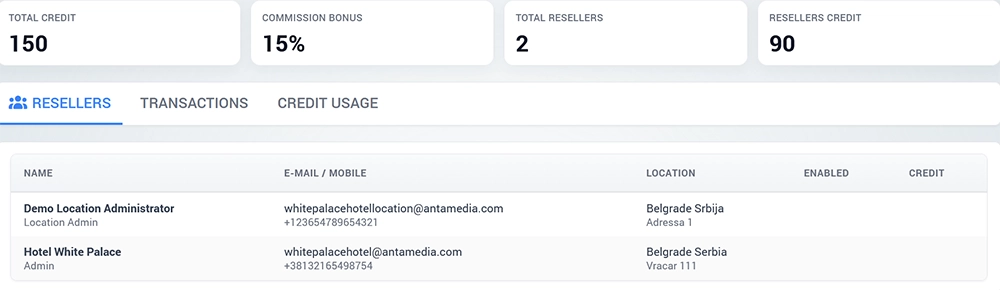
Open the Resellers tab to review the reseller accounts associated with your WiFi Hotspot account.
The table provides information such as:
Name – Reseller or administrator name.
E-mail / Mobile – Contact details associated with the account.
Location – Location assigned to the reseller.
Enabled – Indicates whether reseller functionality is enabled for the account.
Credit – Credit allocated to the reseller.
Use this view to identify who can distribute WiFi access and how reseller accounts are organized across your locations.
Create a Reseller
Reseller accounts are created as administrator accounts with the Reseller role.
To create a reseller:
Open the administrator management section.
Create a new administrator.
Select Reseller as the administrator type.
Enter the reseller contact and account information.
Assign the appropriate location and permissions.
Save the reseller account.
Configure reseller credit when required.
When the WiFi Tickets App is used, the reseller account can also be connected to the application for ticket creation and sales.
Reseller Credit
Credit determines how much value a reseller can use for WiFi access distribution.
The reseller credit system is enabled and configured under My Account → Reseller.
The account-level reseller configuration includes:
Credit enable/disable
Currency
Available credit
Commission or reseller bonus
After reseller credit is enabled, credit activity can be monitored from the Resellers page.
Commission Bonus
The Commission Bonus represents the configured reseller margin or commission percentage.
This allows the main WiFi operator to define the commercial margin available to resellers when they distribute or sell WiFi access.
For example, different reseller arrangements can be created depending on how WiFi tickets or access plans are distributed.
Transactions
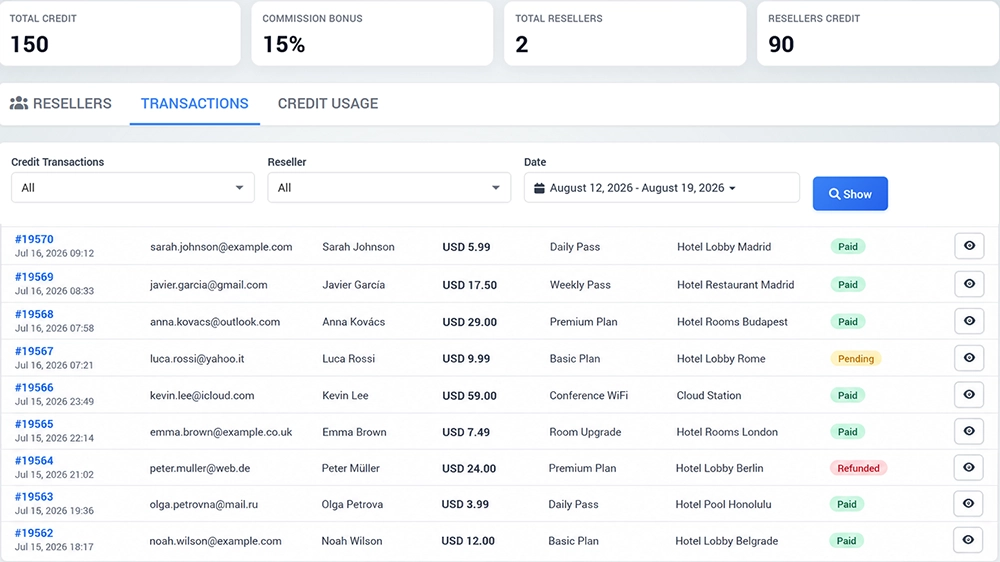
Open the Transactions tab to review reseller credit transactions.
Use the available filters to narrow the report.
Credit Transactions
Select the type of credit transaction you want to review.
Choose All when all available transaction types should be included.
Reseller
Select a specific reseller to review only transactions associated with that account.
Choose All to analyze the complete reseller network.
Date
Select the reporting period you want to review.
After configuring the filters, click Show to display the matching transactions.
This report helps administrators trace changes in reseller credit and review activity over a selected period.
Review Credit Transactions
A typical transaction review is:
Open Resellers → Transactions.
Select the required transaction type.
Select a reseller or choose All.
Select the date range.
Click Show.
Review the displayed credit activity.
Change the filters when a more specific transaction needs to be investigated.
Use the transaction history when reseller balances need to be checked or when credit changes need to be traced.
Credit Usage
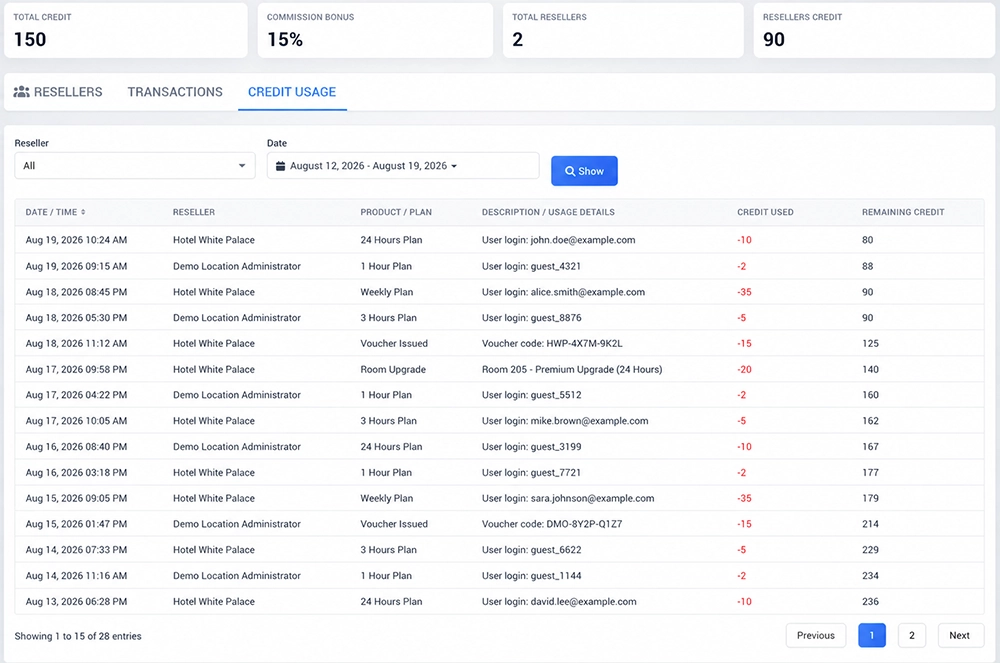
Open Credit Usage to analyze how reseller credit has been consumed during a selected period.
The report can be filtered by:
Reseller
Date
To review credit usage:
Open Resellers → Credit Usage.
Select a reseller or choose All.
Select the required date range.
Click Show.
Review the reseller credit usage for the selected period.
This report provides a separate view of consumed reseller credit instead of showing only credit transactions.
Transactions vs. Credit Usage
The two reports serve different purposes.
Transactions is used to review individual credit activity and changes affecting reseller credit.
Credit Usage focuses on how allocated reseller credit has been consumed over time.
Use Transactions when investigating a particular credit event and Credit Usage when analyzing overall reseller consumption.
WiFi Tickets App
Resellers can use the WiFi Tickets App to distribute WiFi access to customers.
Depending on the reseller configuration, the app can be used to:
Create username and password tickets
Create voucher tickets
Sell access based on different Internet Plans
Issue vouchers for new users
Issue vouchers for account top-ups
Work with reseller credit
Support ticket sales at remote locations
This allows hotels, reception desks, sales points, and other reseller locations to provide WiFi access while the main operator retains centralized control.
How the Reseller Workflow Works
A typical reseller workflow is:
Enable reseller credit under My Account → Reseller when credit-based operation is required.
Configure currency, available credit, and reseller bonus.
Create reseller accounts.
Assign reseller access to the appropriate locations.
Allocate credit to reseller accounts.
Allow resellers to distribute WiFi tickets or access plans.
Monitor reseller accounts under Resellers.
Review credit activity under Transactions.
Analyze consumed credit under Credit Usage.
This provides centralized control over WiFi access distribution while allowing individual resellers or locations to handle customer sales.
Monitor Reseller Activity
Regularly review the reseller dashboard to monitor:
Total reseller credit
Commission bonus
Number of reseller accounts
Credit currently allocated to resellers
Individual reseller accounts
Credit transactions
Credit usage
Use date and reseller filters when investigating activity for a specific reseller or reporting period.
Reseller Management Best Practices
Keep reseller accounts assigned only to the locations and services they need to manage.
When reseller credit is used:
Allocate only the required amount of credit.
Review reseller balances regularly.
Use Transactions to investigate credit changes.
Use Credit Usage to monitor consumption.
Review inactive or unused reseller accounts.
Keep reseller contact information current.
Verify reseller access after changing permissions or location assignments.
This helps maintain clear control over reseller activity while allowing WiFi access to be distributed through multiple sales points.