
Rejected Logins Report
The Rejected Logins report helps administrators identify unsuccessful WiFi login attempts and understand why users were unable to access the network.
The report highlights users with the highest number of rejected login attempts and the most common rejection reasons, making it easier to detect configuration issues, expired accounts, incorrect credentials, or access-limit problems.
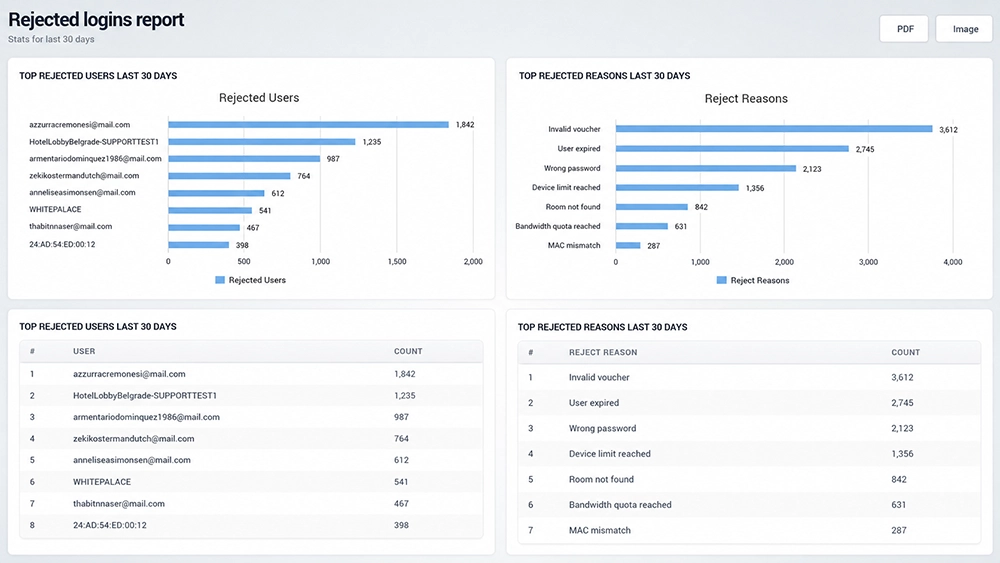
Rejected Users
The Rejected Users chart shows users or devices with the highest number of rejected login attempts during the reporting period.
A rejected user may be identified by:
Username or email address
Account name
Voucher or access identifier
Device MAC address
The number displayed next to each entry represents the total number of rejected login attempts.
A large number of rejections for the same user or device can indicate an account, authentication, or configuration problem that should be investigated.
Reject Reasons
Reject reasons depend on the login method, account configuration, and access limits. They can include invalid credentials, expired access, device or account limits, quota restrictions, PMS verification problems, and other authentication errors.
Common rejection reasons can include:
Invalid voucher – The supplied voucher is not valid.
User expired – The user account or access period has expired.
Wrong password – The entered password does not match the account credentials.
Device limit reached – The account has reached its allowed number of devices.
Room not found – The supplied room information could not be matched.
Bandwidth quota reached – The user has consumed the available bandwidth quota.
MAC mismatch – The device MAC address does not match the device information associated with the account.
These statistics help administrators quickly determine whether rejected logins are primarily caused by user input, account limits, authentication settings, or access policies.
Top Rejected Users
The Top Rejected Users table provides a ranked list of users or devices with the highest number of failed login attempts.
For each entry, the table shows:
User – Username, account identifier, or device MAC address.
Count – Number of rejected login attempts.
Use this information to identify individual accounts or devices that may require further investigation.
Top Rejected Reasons
The Top Rejected Reasons table ranks rejection reasons according to how frequently they occurred.
For each reason, the report displays:
Reject Reason – Reason why access was denied.
Count – Total number of login attempts rejected for that reason.
This makes it easy to identify the most common login problems across the WiFi network.
Export Rejected Login Reports
Use PDF or Image in the upper-right corner to save or share the Rejected Logins report.
This can be useful for troubleshooting, internal reporting, or reviewing recurring authentication problems over time.
How to Use the Rejected Logins Report
Open Analytics → Rejected Logins.
Review Rejected Users to identify users or devices generating the most failed login attempts.
Review Reject Reasons to determine the most common causes of rejected access.
Check the ranked tables for exact rejection counts.
Investigate accounts with unusually high rejection numbers.
If the same rejection reason appears frequently across multiple users, review the related authentication or access settings.
Use PDF or Image when the report needs to be saved or shared.
The Rejected Logins report helps administrators troubleshoot WiFi access problems, identify recurring authentication failures, and determine whether an issue is related to an individual user or a broader network configuration.
Troubleshooting Rejected Logins
When a high number of rejected logins appears in the report, first identify whether the problem affects a single user or many users.
For individual users, check the account credentials, expiration date, device limits, quotas, and other assigned access restrictions.
If the same rejection reason affects many users, review the corresponding WiFi Hotspot configuration or authentication settings.
Rejected login statistics are particularly useful for identifying recurring access problems before they generate additional support requests.