
Loyalty
The Loyalty analytics page helps you understand how often WiFi users return and which users generate the most activity over time. It provides insight into repeat visits, same-day return frequency, and the most active users based on connection time and bandwidth usage.
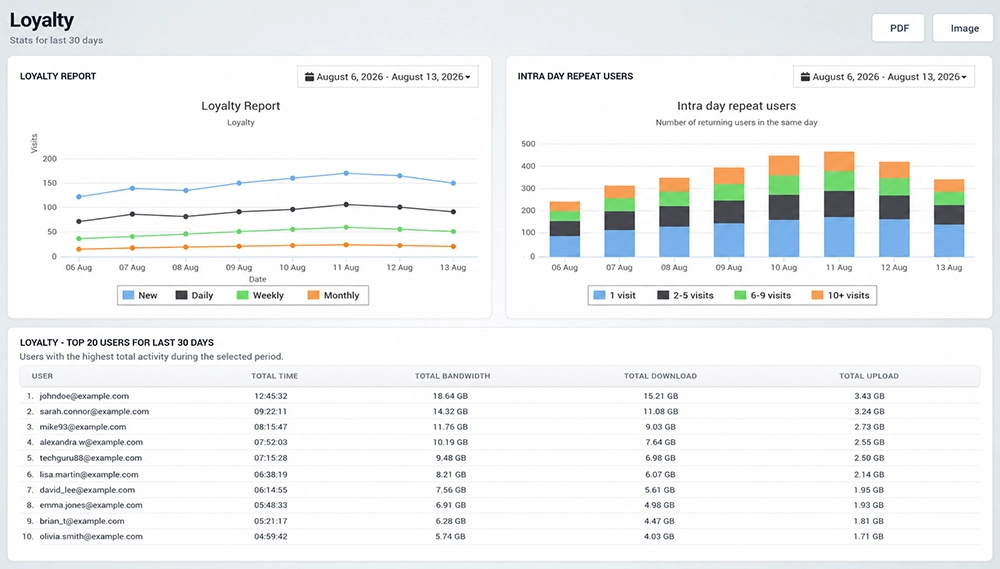
Loyalty Report
The Loyalty Report shows how visitor activity changes during the selected reporting period.
Users are grouped into several loyalty categories:
New – Users recorded as new visitors.
Daily – Users who return on a daily basis.
Weekly – Users who return within a weekly usage pattern.
Monthly – Users who return over a longer monthly period.
The chart makes it easy to compare new visitors with returning users and identify changes in repeat activity over time.
Use the date selector above the chart to analyze loyalty statistics for a specific period.
Intra Day Repeat Users
The Intra Day Repeat Users chart shows how many users return to the WiFi network multiple times during the same day.
Users are grouped by the number of visits:
1 visit
2–5 visits
6–9 visits
10+ visits
This view helps identify how frequently visitors reconnect during a single day.
For example, a higher number of users in the 6–9 or 10+ visit groups may indicate frequent repeat activity at locations where guests connect several times throughout the day.
Top Users
The Loyalty – Top 20 Users table lists the users with the highest total activity during the selected reporting period.
For each user, the table shows:
User – User account or email address.
Total Time – Total accumulated connection time.
Total Bandwidth – Combined network traffic generated by the user.
Total Download – Total amount of downloaded data.
Total Upload – Total amount of uploaded data.
This report makes it easy to identify the most active and frequently engaged WiFi users.
Select a Reporting Period
Use the date selectors above the Loyalty Report and Intra Day Repeat Users charts to define the period you want to analyze.
Changing the reporting period allows you to compare visitor loyalty and repeat usage across different dates.
Export Loyalty Reports
Use PDF or Image in the upper-right corner to save or share the Loyalty analytics report.
These options are useful when loyalty statistics need to be included in internal reports, management presentations, or customer behavior analysis.
How to Use Loyalty Analytics
Open Analytics → Loyalty.
Select the reporting period you want to analyze.
Review the Loyalty Report to compare new, daily, weekly, and monthly visitors.
Check Intra Day Repeat Users to see how often visitors reconnect during the same day.
Review the Top Users table to identify users with the highest total activity.
Compare total connection time and bandwidth usage for the most active users.
Use PDF or Image when the report needs to be saved or shared.
Loyalty analytics help businesses measure repeat visits, identify returning users, and better understand which visitors interact with the WiFi network most frequently.